
ROW'D ROYALTY INDOOR ROWING COMPETITION 2023
About This Competition
Welcome to Row'd Royalty 2023!
DATES: JANUARY 12 - FEBRUARY 6
Workouts are announced on Thursdays at 12:00PM PT. Workout results must be submitted online before Monday at 5PM PT.
Row'd Royalty 2023 is an online, indoor rowing competition using the Concept2 Row Erg. 4 workouts are announced over a 4 week period - 1 workout per week. Some workouts will include multiple scoring opportunities. All results submissions must include a picture of the Concept2 monitor result. Row'd Royalty may request additional data verification up to and including a video demonstration in order to verify results submissions.
2023 prize money awards will be announced on or before January 12, 2023.
REGISTRATION OPENS: Tue NoV 15
Registration Fee: $25
Team Registration: $20 (ALL TEAM MEMBERS MUST REGISTER AS INDIVIDUALS)
If you have any questions, please reach out to info@rowdroyalty.com for assistance. All entries are final. No refunds.
ROW'D ROYALTY DIVISIONS: STANDARD & TALL
Row’d Royalty Height Divisions – Select the proper division per your height (proof may be required)
Standard - Women under 5′ 6″ (<168cm) / Men under 5′ 11″ (<180cm)
Tall - Women 5′ 6″ (168cm) and above / Men 5′ 11″ (180cm) and above
Age Groups (as of February 6, 2023)
40 – 49
50 – 59
60+
4 Person Teams
All 4 competitors MUST register themselves as individuals FIRST along with submitting their own individual scores on a weekly basis.
Teams are made up of 2 Men and 2 Women. They DO NOT have to be from the same Gym, State, or Country.
The Team Captain needs to register his or her team and will be the only team member to submit a team score.
Team Captains need to submit their Teams scores by the appropriate deadline in addition to their own score.
The Team score is the sum of all 4 team members scores.
If any team member does not submit a score or complete a workout the team is disqualified.
Source: Strongest Compete
Your results are already here.
Every competition you've entered, ranked workout by workout. Search your name and find your entire history.
Search the ResultsThe conversation is already happening.
Athletes are commenting, posting photos, and reliving the workouts. Jump in.
See the CommunityReady for what's next?
Browse upcoming competitions near you — your next event is probably already listed.
Find Competitions Near MeHow much stronger are you than last year?
Log PRs for every lift and benchmark workout. Your progress tells the story — KettleBoards keeps track.
Track Your PRsDivisions
Top Results
Top 5 finishers per division. View full results →
| # | Athlete | Points |
|---|---|---|
| 1 | Daniel Viger | 10 |
| 2 | Ryan Thornton | 23 |
| 3 | Sam Harrison | 25 |
| 4 | Dominic Mango | 42 |
| 5 | John Davies | 48 |
| # | Athlete | Points |
|---|---|---|
| 1 | Isaiah Harrison | 14 |
| 2 | Maciej Zawojski | 48 |
| 3 | Zach Fowle | 49 |
| 4 | Nicholas Thomas | 54 |
| 5 | Daniel Duckworth | 74 |
| # | Athlete | Points |
|---|---|---|
| 1 | Kia Taylor | 17 |
| 2 | Danielle Abusow | 18 |
| 3 | Nancy E Cook | 44 |
| 4 | Neeoli Field | 60 |
| 5 | Conni Bond | 61 |
| # | Athlete | Points |
|---|---|---|
| 1 | Kirsten Kline | 20 |
| 2 | Olena Buriak | 23 |
| 3 | Madelyn Brooker | 29 |
| 4 | Elizabeth Gilmore | 33 |
| 5 | Morgan McGrath | 52 |
| # | Athlete | Points |
|---|---|---|
| 1 | Crazy Horses | 9 |
| 2 | Plenty Four-Seven | 27 |
| 3 | Crossfit Tartu Boat Lords | 30 |
| 4 | The Boonies | 45 |
| 5 | "Late Arrivals" | 55 |
Workouts
"Shut Up And Row"
Row 6 intervals of 250 meters with a 45 second rest after each row, then row 1500 meters for time.
Score 23.1 A: Fastest 250 meter row time
Score 23.1 B: Total time for all intervals and rest plus the 1500 meter row.
Monitor Instructions
* YOU MUST USE "INTERVALS VARIABLE" FOR THIS WORKOUT! *
STEP 1: "Select Workout" • "New Workout" • "Intervals" • "Intervals Variable"
STEP 2: Choose - "Distance"
STEP 3: Edit Meters to "250". Set Rest at "00:45" Double check!! Then, press the check box.
STEP 4: Intervals 2-6 - Choose "Distance" - Distance & Rest should be preloaded. Press the check box and repeat until interval 6 is done.
STEP 5: Interval 7 - Choose "Distance". Set Distance to 1500m. IMPORTANT: SET REST TO 00:00!!
STEP 6: Select - "NO MORE INTERVALS"
BEGIN ROWING
SCORE SUBMISSION INSTRUCTIONS
Use "Memory" function on your C2 erg.
Go to the date of the row.
Select the completed workout.
Scroll to the fastest 250m time. Take a picture of the screen.
Submit your fastest 250m time (pay attention to the 00h:00m:00s )
Submit your TOTAL TIME (Including rest!! - Upper right corner of monitor)
"Shut Up And Row"
Row 6 intervals of 250 meters with a 45 second rest after each row, then row 1500 meters for time.
Score 23.1 A: Fastest 250 meter row time
Score 23.1 B: Total time for all intervals and rest plus the 1500 meter row.
Monitor Instructions
YOU MUST USE "INTERVALS VARIABLE" FOR THIS WORKOUT!
STEP 1: "Select Workout" • "New Workout" • "Intervals" • "Intervals Variable"
STEP 2: Choose - "Distance"
STEP 3: Edit Meters to "250". Set Rest at "00:45" Double check!! Then, press the check box.
STEP 4: Intervals 2-6 - Choose "Distance" - Distance & Rest should be preloaded. Press the check box and repeat until interval 6 is done.
STEP 5: Interval 7 - Choose "Distance". Set Distance to 1500m. IMPORTANT: SET REST TO 00:00!!
STEP 6: Select - "NO MORE INTERVALS"
BEGIN ROWING
SCORE SUBMISSION INSTRUCTIONS
Use "Memory" function on your C2 erg.
Go to the date of the row.
Select the completed workout.
Scroll to the fastest 250m time. Take a picture of the screen.
Submit your fastest 250m time (pay attention to the 00h:00m:00s )
Submit your TOTAL TIME (Including rest!! - Upper right corner of monitor)
Complete All of The Following In Order:
800m For Time
Maximum Distance in 6-minutes
REST 4-minutes
Maximum Distance in 9-minutes
400m For Time
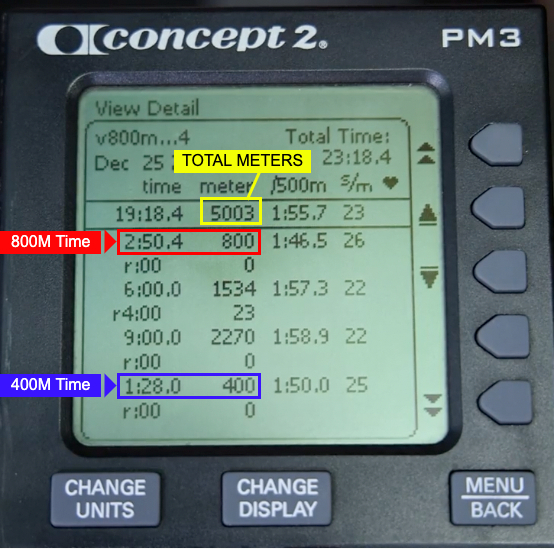
SCORES (See Monitor Pic Below)
800M TIME
TOTAL METERS
400m TIME
MONITOR INSTRUCTIONS
> YOU MUST USE "INTERVALS VARIABLE! <
There are 4 total intervals: 1. Distance, 2. Time + Rest, 3. Time 4. Distance).
Please be careful setting these up!
Select Workout > New Workout > Intervals Variable
Interval 1 > "DISTANCE" > Enter "800m" > "0:00" Rest (no rest) > Checkbox
Interval 2 > "TIME" > Enter "6:00" > "4:00" Rest (IMPORTANT!!) > Checkbox
Interval 3 > "TIME" > Enter "9:00" > "0:00" Rest (no rest) > Checkbox
Interval 4 > "DISTANCE" > Enter "400m" > "0:00" Rest > Checkbox
Interval 5 > "No More Intervals"
MONITOR SCORES
Complete All of The Following In Order:
800m For Time
Maximum Distance in 6-minutes
REST 4-minutes
Maximum Distance in 9-minutes
400m For Time
SCORES (See Monitor Pic Below)
800M TIME
TOTAL METERS
400m TIME
MONITOR INSTRUCTIONS
> YOU MUST USE "INTERVALS VARIABLE! <
There are 4 total intervals: 1. Distance, 2. Time + Rest, 3. Time 4. Distance).
Please be careful setting these up!
Select Workout > New Workout > Intervals Variable
Interval 1 > "DISTANCE" > Enter "800m" > "0:00" Rest (no rest) > Checkbox
Interval 2 > "TIME" > Enter "6:00" > "4:00" Rest (IMPORTANT!!) > Checkbox
Interval 3 > "TIME" > Enter "9:00" > "0:00" Rest (no rest) > Checkbox
Interval 4 > "DISTANCE" > Enter "400m" > "0:00" Rest > Checkbox
Interval 5 > "No More Intervals"
MONITOR SCORES
Complete All of The Following In Order:
800m For Time
Maximum Distance in 6-minutes
REST 4-minutes
Maximum Distance in 9-minutes
400m For Time
SCORES (See Monitor Pic Below)
800M TIME
TOTAL METERS
400m TIME
MONITOR INSTRUCTIONS
> YOU MUST USE "INTERVALS VARIABLE! <
There are 4 total intervals: 1. Distance, 2. Time + Rest, 3. Time 4. Distance).
Please be careful setting these up!
Select Workout > New Workout > Intervals Variable
Interval 1 > "DISTANCE" > Enter "800m" > "0:00" Rest (no rest) > Checkbox
Interval 2 > "TIME" > Enter "6:00" > "4:00" Rest (IMPORTANT!!) > Checkbox
Interval 3 > "TIME" > Enter "9:00" > "0:00" Rest (no rest) > Checkbox
Interval 4 > "DISTANCE" > Enter "400m" > "0:00" Rest > Checkbox
Interval 5 > "No More Intervals"
MONITOR SCORES
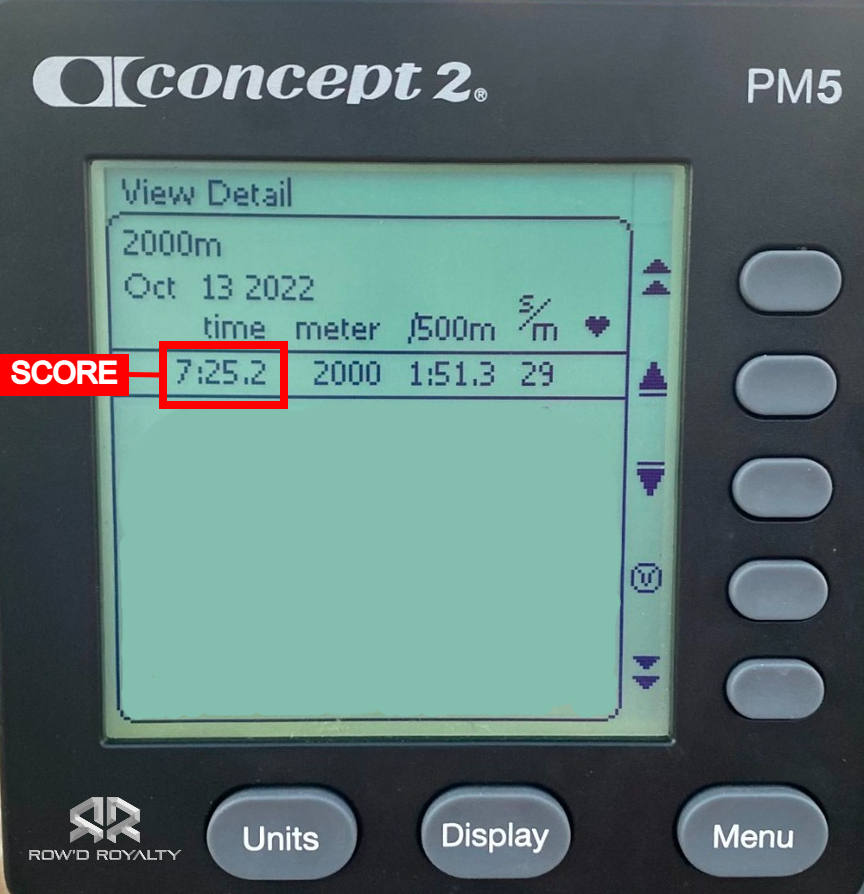
Row 2000 Meters For Time
You may use the "Standard List" > "2000m Row", or program your monitor: "New Workout" > "Distance"
Please submit a picture of your monitor results using the "Memory" function.
VIDEO INSTRUCTIONS
ROW 1,000m + 3000M + 1000M - NO REST
Row the following distances in order, with no rest:
1000 Meters
3000 Meters
1000 Meters
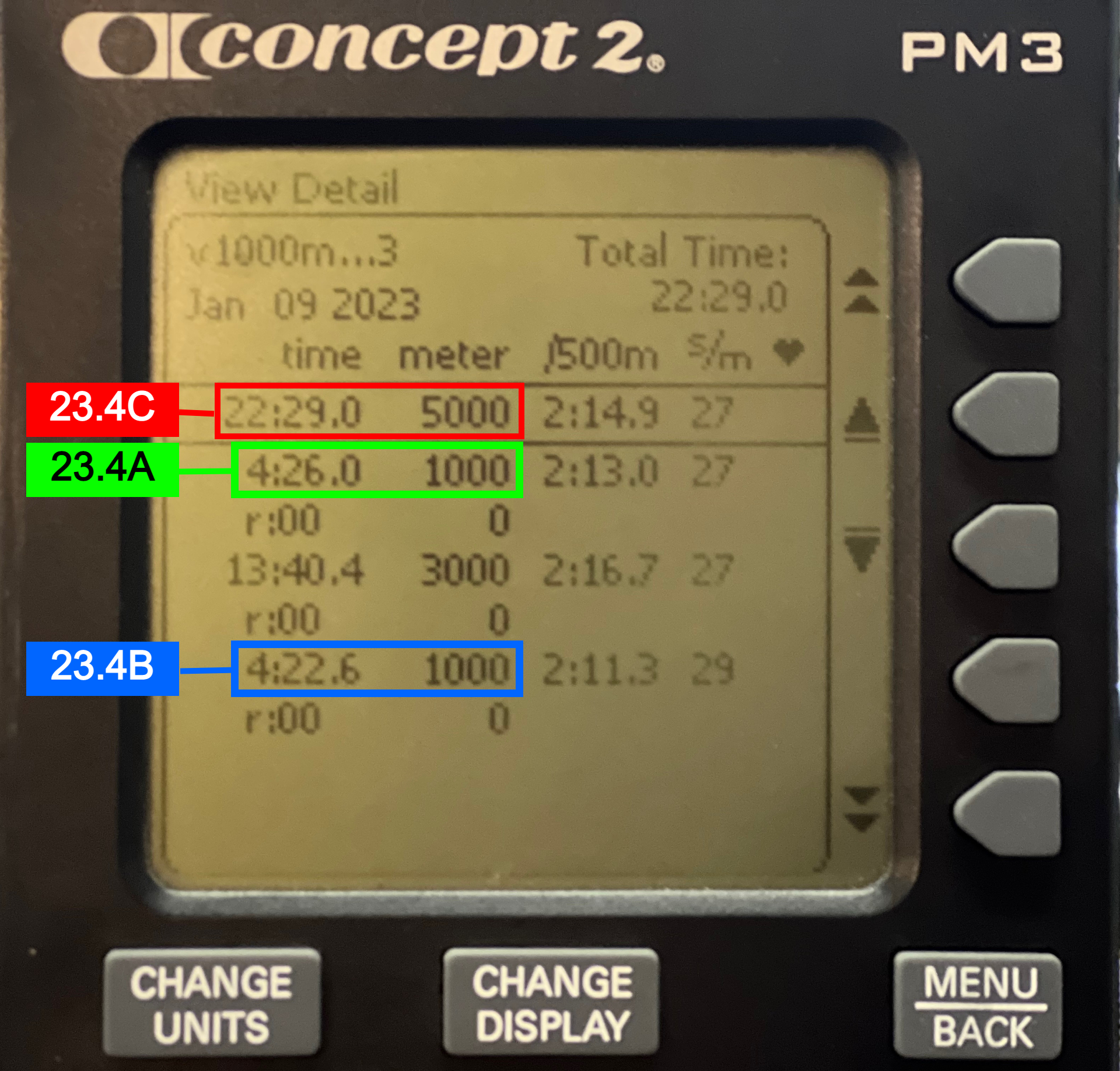
SCORES (IMPORTANT!)
A: First 1,000 Meter Row Time
B. Last 1,000 Meter Row Time
C. Total Time - 5000 Meters
MONITOR INSTRUCTIONS
Select Workout > New Workout
Intervals Variable > Distance > 1000 Meters ( 00:00 REST! ) > √
Distance > 3000 Meters ( 00:00 REST! ) > √
Distance > 1000 Meters ( 00:00 REST! ) > √
NO MORE INTERVALS
Row!
SCORES SUBMISSION - IMPORTANT
ROW 1,000m + 3000M + 1000M - NO REST
Row the following distances in order, with no rest:
1000 Meters
3000 Meters
1000 Meters
SCORES (IMPORTANT!)
A: First 1,000 Meter Row Time
B. Last 1,000 Meter Row Time
C. Total Time - 5000 Meters
MONITOR INSTRUCTIONS
Select Workout > New Workout
Intervals Variable > Distance > 1000 Meters ( 00:00 REST! ) > √
Distance > 3000 Meters ( 00:00 REST! ) > √
Distance > 1000 Meters ( 00:00 REST! ) > √
NO MORE INTERVALS
Row!
SCORES SUBMISSION - IMPORTANT
ROW 1,000m + 3000M + 1000M - NO REST
Row the following distances in order, with no rest:
1000 Meters
3000 Meters
1000 Meters
SCORES (IMPORTANT!)
A: First 1,000 Meter Row Time
B. Last 1,000 Meter Row Time
C. Total Time - 5000 Meters
MONITOR INSTRUCTIONS
Select Workout > New Workout
Intervals Variable > Distance > 1000 Meters ( 00:00 REST! ) > √
Distance > 3000 Meters ( 00:00 REST! ) > √
Distance > 1000 Meters ( 00:00 REST! ) > √
NO MORE INTERVALS
Row!
SCORES SUBMISSION - IMPORTANT
Media
Community
Event Details
Closes: Jan 16, 2023

Find Your Next Competition
Browse hundreds of CrossFit and functional fitness competitions worldwide.

Our goal is to bring the functional fitness competition community together. Organizing information and bringing valuable resources to the space.
Useful Links
Explore More
Competition Resources
Personal Records